Aberrant DSP ShapeShifter v1.1 RETAiL WiN-OSX-FLARE
Inspired by SketchCassette’s NR Comp algorithm, ShapeShifter is a one-of-a-kind dynamics remodeler and character compressor that will completely transform the shape of your sounds. ShapeShifter molds a blend of multi-band upward and downward compression into a toolbox for adding color, body, and gri
资源介绍
Team FLARE | 20 January 2021 | WiN: 31.0 MB | OSX: 35.2 MB
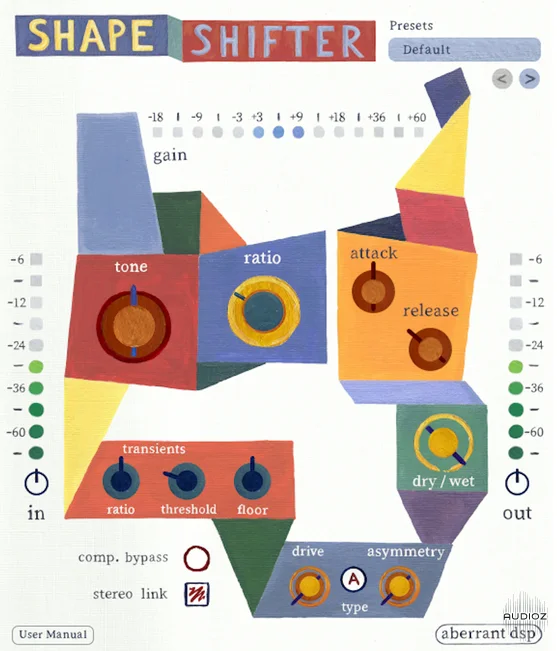
Inspired by SketchCassette’s NR Comp algorithm, ShapeShifter is a one-of-a-kind dynamics remodeler and character compressor that will completely transform the shape of your sounds. ShapeShifter molds a blend of multi-band upward and downward compression into a toolbox for adding color, body, and grit to your sounds. This can take the form of anything from a subtle vibe boost to blown-open, raucous carnage.
Features:
- Upward / Downward compression controlled with a common Ratio
- Transients section with Ratio and Threshold controls, allowing for separate control of downward compression
- Upward compression Floor control for taming room sound or unwanted noise
- Flexible envelope shaping through Attack and Release time controls
- Tone adjustment for broad shifts in color and character
- A wide-ranging Drive control with two models: A (gentle) and B (hard)
- Asymmetry control for attaining harsher, grittier drive textures by way of even-order harmonics
- Dry / Wet mixer for easy parallel processing
- Custom preset system with 64 factory presets, showcasing ShapeShifters versatility
Technical Info:
ShapeShifter supports the following formats and operating systems:
Windows 7 or later – VST3 and AAX at 64-bit
macOS 10.10 Yosemite through macOS 11 Big Sur – Intel or Apple Silicon – AU, VST3, and AAX at 64-bit
To install ShapeShifter onto your computer, simply run the installer package for your OS.
Restart your digital audio workstation before loading in the plugin to a project. On macOS, you may need to restart your computer for new plugins to appear in some hosts.
Version 1.1
This update adds the following features:
- Left and right preset selection arrows for fast and easy auditioning of settings
- Preset Category label (General, Drums, Extreme etc.) to let you know where your current preset is located in the preset list