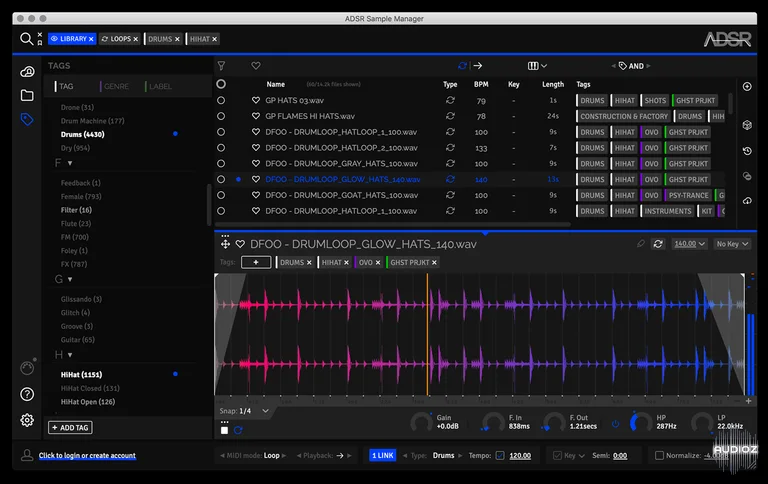
ADSR 声音样本管理器 v1.7.4 VST AU AXX x64 x86 WiN MAC [免费]
A Smart Sample Management Tool. ADSR Sample Manager makes your entire sample library searchable with smart and custom tags. Preview any sample in your local library or purchased on ADSR in the context of your track (BPM and/or key synced) using MIDI or drag audio directly to your project. Now availa
资源介绍
FREE | 22 February 2022 | 142 MB
A Smart Sample Management Tool.
ADSR Sample Manager makes your entire sample library searchable with smart and custom tags. Preview any sample in your local library or purchased on ADSR in the context of your track (BPM and/or key synced) using MIDI or drag audio directly to your project. Now available for VST/AU/AAX and standalone.
Updated to version 1.7.2
The optimal starting point for every production session, ADSR Sample Manager makes organizing, finding and auditioning samples refreshingly simple.
The most effective way to access all your samples at once, ADSR Sample Manager keeps your project in the flow. Work in standalone or keep all the action right in your DAW with the plugin. Search all your local samples or your purchased ADSR samples in the cloud by type, genre, bpm or key. Best of all… it’s FREE!
ADSR Sample Manager features
Apple silicon native support (new in 1.7.0)
Expand your library – Browse a near-unlimited library of sounds
Find sounds with similar tags
Automatically tags all your samples in a flash
All your samples (local or cloud) searchable in an instant
Standalone or VST/AU/AAX
Hear samples in the context of your music with MIDI input
Sync key and BPM to preview samples in context
ADSR Account integration – browse your purchased samples in the cloud, preview in real time and download what you need.
Ableton LINK – sync your loops and one-shots with others using multiple devices running Link-enabled software / mobile apps
Tag by sound type, genre or label
Favourite Collections (new in 1.7.0)
Multiple searches in one instance with search tabs (new in 1.7.0)
Frequency analysis with waveform display (new in 1.7.0)
Detect duplicate samples
Drag samples directly into your project (raw or processed)
Key detection and transpose to key
Use multiple instances directly in your project
Loops sync to your project tempo
Quantised start points
Trim sample start and end points
Play samples forward, reverse or ping pong
Order by sample info : type, key, bpm, tag, length, file size and date
Order by sample info (new in 1.7.0) : file path, library, effective length, bit depth, sample rate, channel count & codec
Save your favourite sounds and searches
Use with services like Splice, Noiiz and Loopcloud
Instant inspiration with the random button
Unlock your sample library and find the perfect sound
Ever gotten half way through a track and wished you’d tried a different sound? Do you feel like half your production time is lost to sorting through sample folders and files? Do you even really know what sounds you actually have in your current sample library?
Forget empty promises made at midnight that one day you’re going to clean up your hard drive. Download ADSR Sample Manager – it’s free and it works.
New in ADSR Sample Manager 1.7
Added Favourite Collections
Added Search tabs
Added frequency analysis to waveform display
Added new columns: file path, library, effective length, bit depth, sample rate, channel count & codec
Added Apple Silicon native support
Improved add tag dialogue
Improved stability
Improved zooming when using the +- buttons or pinch gesture
Fixed folder list closing when files dragged from Sample Manager
Fixed tag panel not showing at startup
Fixed missing tag buttons in sample view
Fixed crash when editing BPM for multiple samples
Fixed problem with all tags disappearing after restore from settings panel
Fixed issue with selecting tags from the auto-complete list when in AND mode and the text partial excludes the tag selected
Fixed issue where downloading files from website purchases would ask for library refresh at every startup
Various small bug fixes and UI improvements
相关推荐
效果器插件
ArtsAcoustic - Reverb 1.6.0.15、BigRock 1.0.7、CL Series 1.0.19、VST x86 x64(无需安装,SymLink 安装程序)[19.03.2017]
效果器插件
Xfer Records OTT v1.21 x64 x86 VST AU AAX WiN MAC [免费]v1.21


效果器插件
iZotope Photon v2027.0.10 - VRv2027.0.10


效果器插件