Allavsoft Video and Music Downloader v3.27.6.9076-F4CG
Two steps to download movies, video, music files and subtitles from 1000+ media sharing sites like YouTube, Spotify, Facebook, Vimeo, Twitter, eHow, Dailymotion, Viki, Break, Metacafe, BlipTV, Crunchyroll, Deezer, Soundcloud, SBS, Tenplay, Plus 7, ABC iView, Medici.tv, Lynda, Udemy, PBS, BBC, cbc.ca
资源介绍
Team F4CG | 09 November 2024 | 57 MB
Two steps to download movies, video, music files and subtitles from 1000+ media sharing sites like YouTube, Spotify, Facebook, Vimeo, Twitter, eHow, Dailymotion, Viki, Break, Metacafe, BlipTV, Crunchyroll, Deezer, Soundcloud, SBS, Tenplay, Plus 7, ABC iView, Medici.tv, Lynda, Udemy, PBS, BBC, cbc.ca, Livestream, Kissasian, MegaVideo, Veoh, VideoBash, LiveLeak, MyVideo, FunnyOrDie, Nico Video, TV.com, Veevr, Adobe TV etc
One-step to download and convert online video files to any video format
Besides downloading video in its original format, Allavsoft also features one-click to download as well as convert the downloaded video to popular video format like MP4, AVI, WMV, MOV, MPEG-1, MPEG-2, VOB, ASF, RMVB, DV, TS, Apple ProRes, WebM, FLV, OGV and etc.
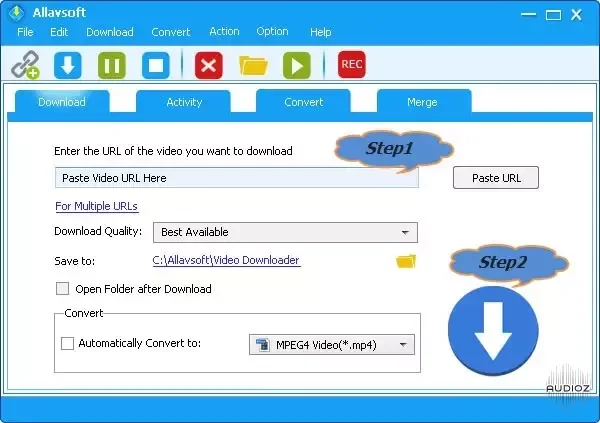
Step1: Copy and paste the video url or drag and drop the video url to Allavsoft
Step2: Check before "Automatically Convert to" and then click the drop down triangle to select desired video format from General Video category
Step3: Click the Download button to begin the downloading and converting process.
To learn more on how to download online videos to any video format, please refer to this
One-click to extract audio from online video files
This professional Video Downloading and Converting tool also helps to extract and download audio from online music video or movies as well as convert to popular audio format like MP3, WMA, WAV, AAC, AAC, Apple Lossless M4A, AIFF, RA, FLAC, OGG, AU and etc.
Powerful download features and functions
Batch download and convert
Allavsoft supports adding multiple video URLs and batch downloading and converting multiple videos at a time.
When download web video files, this wonderful Video Downloader will automatically detects advertisements and does not download them.
Preview and playback downloaded video files
There is a built-in video player in Allavsoft for us to preview and playback the downloaded video files.
Breakpoint Resume
You can pause and resume downloading at any time. It is very convenient to use.
Action after download done
You can set automatically shut down computer after all the download tasks are finished, if you have lots of videos to download and want to leave your Windows on to download them.
Download YouTube VR 360 Videos
Copy and paste the YouTube VR video link to Allavsoft and click Download button, then it will download the VR videos to your computer.
You may download and install PotPlayer to watch the VR 360 videos: Video > 3D Video Mode > Enable 3D Video Mode, SBS (Side by Side); Video > 360 Video Mode > Enable 360 Video Mode, Equi-Angular Cubemap 2x3 (Google Stereo)
High Download Speed
Download videos at the highest speed possible without any limitations
Schedule download times
Allavsoft allows to schedule a download to run during offpeak hours if your internet connection has 'Peak' and 'Off Peak' download limits.
Enable chapter preservation in the downloaded video.
It would certainly be helpful for all users to be able to skip to the proper chapter without fast forwarding or doing post-processing to do that.For example, when you play the downloaded video with VLC, you may click Playback -> Chapter to choose which chapter you want to play.
Keep history for downloading.