Audec Drive v1.0.0 VST AU MAC [FREE]
vst au mac, 5mb Drive is a flexible waveshaping effect that makes a variety of sounds from soft saturation to aggressive distortion. It’s shaping curve can be adjusted continuously. It allows you to make the shaping curve you like, such as soft clip, hard clip, tube-like asymmetric curve, and so on.
资源介绍
vst au mac, 5mb
Drive is a flexible waveshaping effect that makes a variety of sounds from soft saturation to aggressive distortion.
It’s shaping curve can be adjusted continuously. It allows you to make the shaping curve you like, such as soft clip, hard clip, tube-like asymmetric curve, and so on.
User Interface
Scope
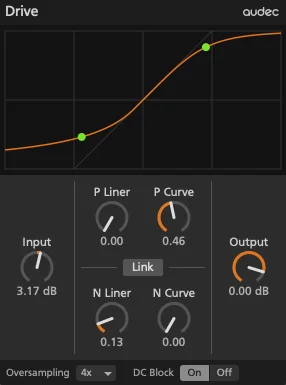
The scope visualizes shaping curve (transfer function) that maps Input and output values to the horizontal and vertical axes, respectively. 2 green points visualizes the positive and negative peak of the audio signal.
Input
The Input control adjusts the amount of gain. Increasing the amount of gain produces more harmonics.
P Liner
The P Liner control adjusts the size of the linear region of the positive side.
In the linear region, the waveshaper does not alter the input signal in any way.
P Curve
The P Curve control adjusts the curve in the non-linear region of the positive side.
N Liner
The N Liner control adjusts the size of the linear region of the negative side.
N Curve
The N Curve control adjusts the curve in the non-linear region of the negative side.
Link
The Link button toggles the on/off state of link function that links the positive and negative shaping curve.
Output
The Output control adjusts the output volume.
Oversampling
The Oversampling chooser selects the oversampling factor. Oversampling reduces alias noise caused by nonlinear effects such as saturator, overdrive, distortion, and clipper. Increasing the oversampling factor can reduce alias noise more, but increases CPU load and latency.
Off, 2x, 4x, 8x, 16x
DC Block
The DC Block button toggles the on/off state of the high-pass filter that removes the direct-current component from the audio signal before output. Normally leave it on.
Operating the controls
Fine-tune the knob
To fine-tune the knob, hold down the shift key and drag the knob.
Reset the knob
To reset the knob to the default value, double-click the knob.
System Requirements
VST3 or AU host DAW
Mac OS 10.11 or newer (64-bit)







