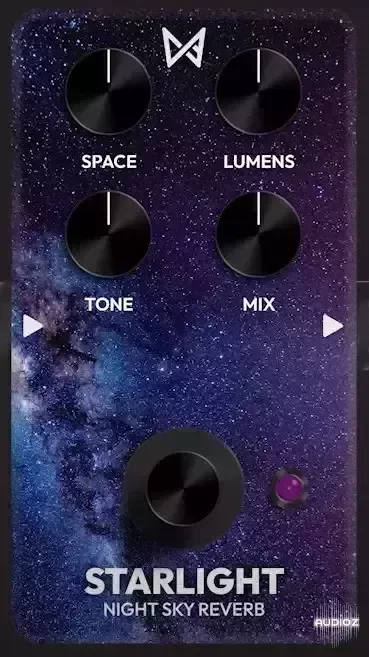
Chaos Audio Starlight Night Sky Reverb v2.0.0/2.0.1 VST3 AU WiN MAC [FREE]
Starlight is a shimmer reverb. Designed to produce the wonder of staring up at the night sky, it has the ability to include twinkling octaves on the reverb trail. With loads of Space on tap, this reverb sounds lush and ambient, with or without shimmer dialed in via the Lumens knob. Starlight is perf
资源介绍
12/07/2024 | VST3 AU WiN MAC | 24 MB
Starlight is a shimmer reverb. Designed to produce the wonder of staring up at the night sky, it has the ability to include twinkling octaves on the reverb trail. With loads of Space on tap, this reverb sounds lush and ambient, with or without shimmer dialed in via the Lumens knob.
Starlight is perfect for pads or lead lines, and the Tone knob decides exactly how bright the night sky will shine.
Space: Size of reverb
Lumens: Amount of shimmer
Tone: Brightness of trail
Mix: Amount of effect
INSTALLATION INSTRUCTIONS
Windows (VST3):
Download the VST3 plugin file
Move the file into your VST3 plugins folder
(The common location is: C:\Program Files\Common Files\VST3)
Rescan for plugins within your favorite DAW and search for “Starlight”
...................................
Mac (AUv2):
Download the AUv2 plugin file
Unzip the ".zip" folder
Move the item titled "Starlight.component" into your AUv2 plugins folder
(The common location is: ~/Library/Audio/Plug-Ins/Components)
Rescan for plugins within your favorite DAW and search for “Starlight”
Add Starlight to a virtual instrument or audio track
You will get the following warning:
"'Starlight.component' can’t be opened because Apple cannot check it for malicious software."
Launch your Mac's "System Settings" and navigate to "Privacy & Security"
Scroll down until you see the following prompt:
"'Starlight.component' was blocked from use because it is not from an identified developer."
Click "Allow Anyway" and use your fingerprint or password to confirm
Relaunch your DAW and add Starlight to a virtual instrument or audio track
Click "Open" on the dialog that appears
Now you're all set to continue using Starlight!
Current versions available:
WiN - v2.0.0
MAC VST3 - v2.0.1
MAC AU - v2.0.0







