Consistent Interruption Panacea v1.0.1 Win Linux [FREE]
Panacea is an autopan audio effect plugin with the possibility of humanization Panacea is an autopan audio effect plugin with the possibility of humanization, syncing to the host tempo and basic visualization for 64-bit Linux (VST2) and Windows (VST2, VST3). With its help, you can easily add more li
资源介绍
FREE | Win Linux VST2 VST3| 12 MB
Panacea is an autopan audio effect plugin with the possibility of humanization
Panacea is an autopan audio effect plugin with the possibility of humanization, syncing to the host tempo and basic visualization for 64-bit Linux (VST2) and Windows (VST2, VST3). With its help, you can easily add more life and variety to your music.
Panacea is free and open source software released under the GPLv3 license.
How to use
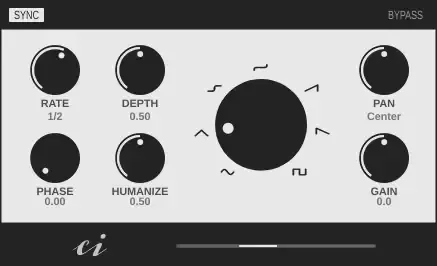
Sync
Switches between free mode and synchronization to the host tempo.
Bypass
Bypass the Plugin.
Rate
Set the speed of the LFO. In non-synced mode, the frequency can be set in Hz. In synced mode, you can choose between 32 time units - from 16/1 to 1/32 T.
Depth
Sets how strongly the LFO affects the panning. At zero it has no influence at all and at 1 it affects the entire stereo width. However, the depth is proportional to the panning. For example, if Pan is set to the far left and Depth is set to 1, the signal only moves between the far left and the center.
Phase
Shifts the phase of the LFO. For example, you can use this to shift the maximum deflection of the LFO from the on beat to the off beat. The phase can only be adjusted in synced mode.
Humanize
That's the special thing about this autopan plugin. Here you can set how strongly a random generator affects the rate of the LFO, sometimes slowing it down and sometimes speeding it up. In non-synced mode the random generator influences the LFO all the time and in synced mode periodically.
Waveform
The waveform of the LFO can be selected with the large waveform knob in the center. Click on one of the waveform images to jump directly to it.
Pan
The pan control is used to shift the signal in the stereo field.
Gain
Adjusts the output volume of the plugin in dB.







