Dillon Bastan Superposition v1.0.0 M4L AMXD WAV AIFF ABLETON DEVICE PRESETS-GTA
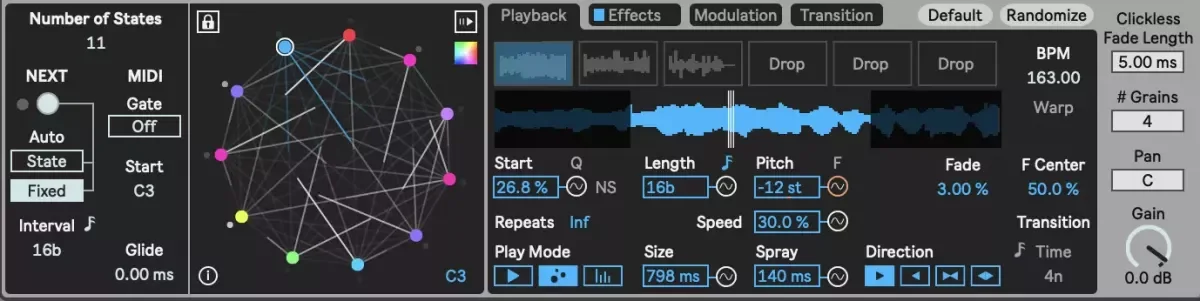
Superposition is a monophonic probabilistic concatenative multisampler with an inbuilt multi-fx and modulation system. It centers around transitioning between playback States; each State essentially is a preset for playback (including playing different samples), FX, and modulation settings/mappings.
资源介绍
GTA | 18 February 2025 | 35.9 MB
Superposition is a monophonic probabilistic concatenative multisampler with an inbuilt multi-fx and modulation system. It centers around transitioning between playback States; each State essentially is a preset for playback (including playing different samples), FX, and modulation settings/mappings. Additionally there are three playback modes (normal, grain, spectral) for time stretching and freezing effects. You can transition between playback States using the Markov probability system or through MIDI notes (or both simultaneously!). The device is pretty open ended and has many uses but it is great for sample mangling/cut up, generative melodies, jungle DnB and other breakbeats, glitchy FX/rhythms/textures, ambient progressions, and quite a lot more depending how you set it up!
Comes with:
The device, user manual, 29 presets, 7 samples
Version Info:
Works with Live 10 and up!
Features:
Probabilistic Markov system that can switch between different playback States
Manual and two modes of Auto triggering the next playback State
MIDI control of playback States and gating playback
Parameter transition gliding
Ability to lock and loop the last set number of transitions (for a repetitive rhythm)
2D interface for editing the different States
Up to 16 Playback States of various parameters:
Selection of playback between up to 6 samples (which can be warped individually to retain the rhythm of their original tempo)
3 different start position modes: percentage of sample, bars/beats, and a No-Start mode where the last sample and left off position are used instead
3 different playback modes: normal, granular, and spectral. Granular and spectral have a speed parameter for time stretching. Granular mode has grain size and spray options
Playback direction, loop length, repitions, volume fade window, and independent auto transitioning parameters
Basic effects: filter, distortion, sample reduction, wavefolding, phaser, delay, and reverb
Modulation sources: ADS envelope, step sequencer, LFO, and random spray. Most of the State parameters mentioned above can be modulated. Modulation values and their mappings are individual per State!
Transition probabilities
Randomization options for each parameter category
To Install And Use Presets:
Drop the entire folder called 'Superposition' (NOT the folder called 'Superposition v.x.x.x') into the folder 'ableton/user library/presets/instruments/max instrument'. This is found in the 'Places' section in Live's browser or in your finder/file browser. If you are going through finder (mac) the Ableton folder is typically in your 'Music' folder. If you are going through your file browser (windows) it is typically in the 'My Music' folder. The path to the .amxd file should be: 'ableton/user library/presets/instruments/max instrument/Superposition/Superposition.amxd'
Want to support me for more amazing releases? Check my Profile Page for more info! Thank you :)