Intel OpenVINO AI Plugins For Audacity v3.7.0 R4.0 x64 WiN [FREE]
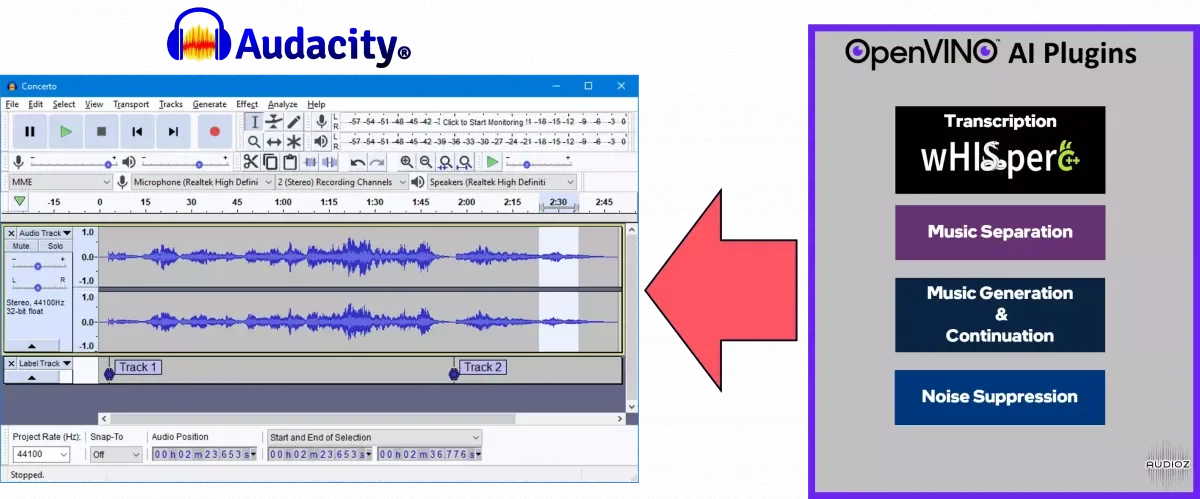
Music Separation, Noise Suppression, Music Generation & Continuation, Whisper Transcription A set of AI-enabled effects, generators, and analyzers for Audacity®. These AI features run 100% locally on your PC 💻 -- no internet connection necessary! OpenVINO™ is used to run AI models on supported acce
资源介绍
FREE | WiN x64 | 72 MB / 2.83/6.34 GB
Music Separation, Noise Suppression, Music Generation & Continuation, Whisper Transcription
A set of AI-enabled effects, generators, and analyzers for Audacity®. These AI features run 100% locally on your PC 💻 -- no internet connection necessary! OpenVINO™ is used to run AI models on supported accelerators found on the user's system such as CPU, GPU, and NPU.
Music Separation🎵 -- Separate a mono or stereo track into individual stems -- Drums, Bass, Vocals, & Other Instruments.
Noise Suppression🧹 -- Removes background noise from an audio sample.
Music Generation & Continuation🎶 -- Uses MusicGen LLM to generate snippets of music, or to generate a continuation of an existing snippet of music.
Whisper Transcription🎤 -- Uses whisper.cpp to generate a label track containing the transcription or translation for a given selection of spoken audio or vocals.
Compatibility 🔧
⚠️ This plugin release is only compatible with Audacity 3.7.0 64-bit Release for Windows -- so make sure you have this version of Audacity installed!
⚠️ If you've previously installed any of our 3.6.X or 3.5.X plugin releases, the recommendation for upgrade is to not uninstall the previous version. Instead, just download this version and select Install no models from the drop down list. This way, you won't need to re-download all of the models again.
⚠️ Make sure to select an Audacity 3.7.0 location during installation. If you have multiple Audacity versions installed, the installer may select the wrong location by default -- so be mindful of this, and manually adjust this using the browse button if needed.
System Requirements
Supported Hardware
Spoiler:
Certain hardware, including but not limited to GPU and NPU, requires manual installation of specific drivers and/or other software components to work correctly and/or to utilize hardware capabilities at their best. This might require updates to the operating system, including but not limited to Linux kernel, please refer to their documentation for details. These modifications should be handled by user and are not part of OpenVINO installation.
CPU
Intel® Core™ Ultra Series 1 and Series 2 (Windows only)
Intel® Xeon® 6 processor (preview)
Intel Atom® Processor X Series
Intel Atom® processor with Intel® SSE4.2 support
Intel® Pentium® processor N4200/5, N3350/5, N3450/5 with Intel® HD Graphics
6th - 14th generation Intel® Core™ processors
1st - 5th generation Intel® Xeon® Scalable Processors
ARM CPUs with armv7a and higher, ARM64 CPUs with arm64-v8a and higher, Apple® Mac with Apple silicon
GPU
Intel® Arc™ GPU Series
Intel® HD Graphics
Intel® UHD Graphics
Intel® Iris® Pro Graphics
Intel® Iris® Xe Graphics
Intel® Iris® Xe Max Graphics
Intel® Data Center GPU Flex Series
Intel® Data Center GPU Max Series
1-You need Audacity v3.7.0 x64 for Windows.
2-You can download models yourself with the OpenVINO installer, or download pre-provided models and copy them into the Audacity folder (without internet connection).
3-For offline and online machines: Download the OpenVINO installer, and during the installation process, select "install no models." After installation, unzip the downloaded OpenVINO models and copy the extracted folder to C:/Program Files/Audacity.
4-Inside Audacity: Go to Edit > Preferences > Modules and set mod-openvino to "Enabled."
5-There are three sets of files inside the Peeplink:
the OpenVINO Plugins Installer
the OpenVINO Models (which include Music Separation, Noise Suppression, Music Generation and Continuation)
the Whisper Models (provided separately for those who don’t need them).
相关推荐
工具软件
AI电子书音频转换器 v1.1.30 WiNv1.1.30


工具软件
Ableton Live 12 Suite v12.4.16 U2B macOSv12.4.16
工具软件
AIR Music Technology OPx-4 Pro Motion OPx-4 Expansion Pack v1.0.4 WiN EXE [ORiGiNAL iNSTALLER] + FiXED Presets XPL-ARCADiAv1.0.4
工具软件