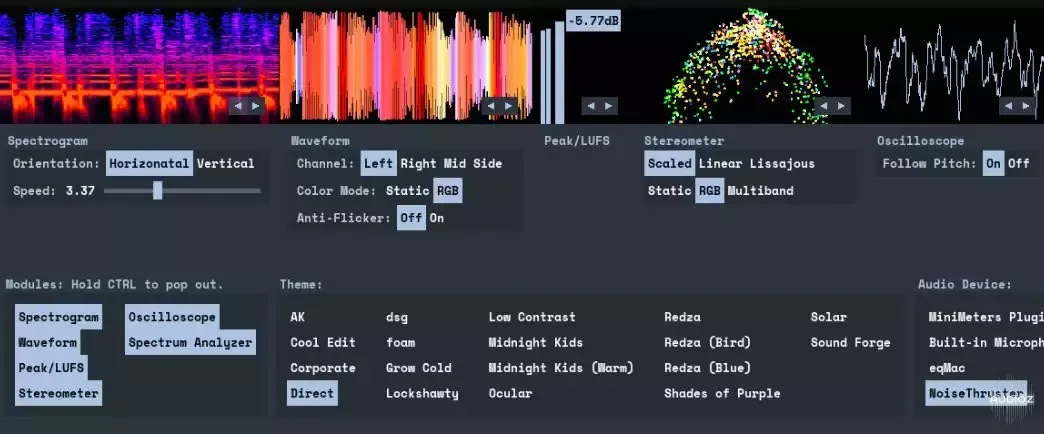
MiniMeters v1.0.29.252 (Win/macOS/Linux)
MiniMeters is a simple audio metering Application & Plug-In suite for Windows, macOS, and Linux. In the Standalone app, monitor any stereo Input, Output*, or use the included Audio Server plug-in to send audio into the MiniMeters app. New in v1.0:MiniMeters now includes plug-in versions of each mete
资源介绍
AudioZ Exclusive | 04.2026 | 232 MB
MiniMeters is a simple audio metering Application & Plug-In suite for Windows, macOS, and Linux. In the Standalone app, monitor any stereo Input, Output*, or use the included Audio Server plug-in to send audio into the MiniMeters app.
New in v1.0:MiniMeters now includes plug-in versions of each meter and the new Quad Layout.
Customize the layout of meters in a Horizontal bar, pop out meters to create a custom layout, or swap to the new Quad Layout for a simple display to cover most needs.
Choose your own Modules
Mix & Match modules to find the best layout for you.
New! VU
A classic VU meter module.
Style: Select between two styles (Screenshot shows "Style 1")
Channels: Select between the Left, Right, Mid, or Side.
Cal: Adjust the input volume.
Indicators:
Peak: Show a yellow light if the signal exceeds a particular volume.
Clip: Show a red light if the signal exceeds a particular volume.
Waveform
See the waveform representation of your audio in realtime.
Channels: Select between the Left, Right, Mid, or Side. Or a combination of two as two separate channels.
Color Modes: Static, Multi-Band, Color Map
Peak History: Display the Multi-Band level history on top the Waveform.
Speed: Adjust the speed of the Waveform display.
New! Loop: Disable scrolling.
New! Time Code: Display Time Code information from your DAW when using the VST / AU / CLAP or Audio Server plug-in.
Spectrogram
View the frequency history of your audio.
New! FFT Size: 1024, 2048, 4096, 8192
FFT Scale:
New! Mel: A "Musical" scale similar to Logarithmic with less reserved for low frequencies.
Logarithmic
Linear
Orientation: Horizontal, Vertical
New! Tilt: Adjust the balance between the low and high frequency content.
Mode:
New! Sharper: Improved timing + frequency detail.
Sharp: Improved frequency detail.
Classic: A classic spectrogram view.
New! Piano Overlay: Display a Piano overlay to help discern musical notes in the Spectrogram view.
New! Frequency Overlay: Display tradition frequency lines.
New! Loop: Disable scrolling.
Spectrum
View the frequency content of your audio.
Mode: FFT, Color Bars, Both
Smoothing: Adjust how quickly the display updates.
Channel: Select Left/Right or Mid/Side.
dB/Hz/Note Overlay: Display the the loudest frequency's pitch in an overlay. Useful for finding the key of a song or sound.
FFT Size: 1024, 2048, 4096, 8192, 16384
FFT Scale:
New! Mel: A "Musical" scale similar to Logarithmic with less reserved for low frequencies.
Logarithmic
Linear
New! Target Curve: Drag a WAV, MP3, or FLAC file to create an overlay of the frequency balance of the dragged file.
Stereometer
Check the stereo width and balance of your audio.
Display Mode:
Scaled:View lower volume samples with ease.
Linear: A 1-to-1 mapping of the incoming audio, rotated for stereo monitoring. (Visible in the screenshot)
Lissajous
Color Mode:
Static: Shows a solid color for each 'dot' in the display.
RGB: The color for each 'dot' is chosen based on the overall frequency balance.
Multi-Band: 3 overlaid view for the Low, Mid, & High bands.
New! Correlation Meter:
Single-Band: Shows the overall correlation.
Multi-Band: Shows the correlation of the Low, Mid, & High bands separately. As well as the overall correlation. (Visible in the screenshot)
Loudness
See a simple view of your immediate peak value and LUFS or RMS value.
Mode:
LUFS: Momentary: 0.4s window
LUFS: Short-Term: 3.0s window
RMS: Fast: 0.3s window
RMS: Slow: 1.0s window
Oscilloscope
See the most immediate wave representation of your audio in realtime.
Follow Pitch: Track the zero-crossings to maintain a consistent view.
Cycle: Multi Single
New! Save What You Hear
New ways to capture audio using MiniMeters.
Record audio directly from MiniMeters
Quickly record and capture audio from the selected audio source.
Clip the previous 10 / 60 seconds of audio
MiniMeters saves the previous 10 seconds and 60 seconds of audio received for immediate capture.
Drag directly into your audio tool of choice.
Enabled via the additional settings button on the main toolbar.
New! MiniMeters Plug-Ins
Load each Module as a Plug-In in your DAW of choice.
An image of the MiniMeters Quad Layout visible in the MiniMeters Plug-In.
Try the new Quad Layout...
MiniMeters now includes a new layout called "Quad" which is perfect for a second monitor or inside of your DAW as seen in this screenshot.
An image of the Spectrogram and Waveform modules begin hosted by Bitwig 5.
...Or Load Individual Plug-Ins
Insert your favorite module for quick metering without leaving your DAW.
New! Stick Mode
MiniMeters behaves like a toolbar on Windows & Linux*
No More Window Management Woes...
MiniMeters' Horizontal Layout now behaves like a toolbar making window management a breeze.
Linux users rejoice: MiniMeters is now usable on Wayland tiling window managers.







