MonsterDAW GOLDEN Piano v2.0 x64 VST VST3 AU WiN MAC [免费]
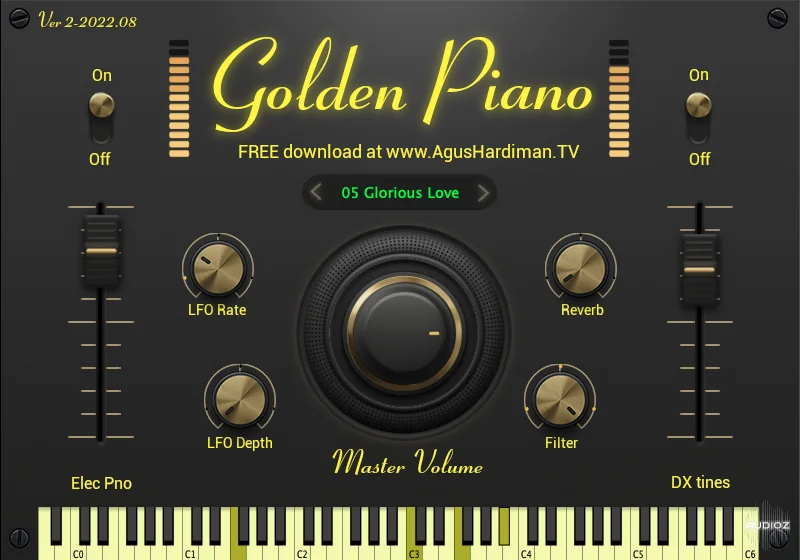
Golden Piano is a Piano virtual instrument that sounds like the sound of ’80s and ’90s, the golden era of music, brought by musicians like David Foster, Chicago, etc. Whether you need a Piano layered with Synth Pad or a Piano layered with Electric Piano, you’ll find that Golden Piano is becoming you
资源介绍
FREE | 17 September 2022 | 1.54 GB
Golden Piano is a Piano virtual instrument that sounds like the sound of ’80s and ’90s, the golden era of music, brought by musicians like David Foster, Chicago, etc.
Whether you need a Piano layered with Synth Pad or a Piano layered with Electric Piano, you’ll find that Golden Piano is becoming your Go-To piano plugin for your music.
GOLDEN PIANO Features (v2-2022.08)
- 5 iconic 80s and 90s Piano presets (This will be updated regularly, please sign-up for my newsletter in this AHTV blog HOMEPAGE to be notified of updates).
- Global Volume, LFO Rate, and Depth, Filter, and Reverb.
- Parameter Automation to dynamically change sounds that fit your music (Read below on ‘How To Automate Golden Piano Parameters‘).
- Soundbank/Presets can be placed on an external hard disk, no need to place it in a startup drive (Read step #4 below on ‘Golden Piano Download Links and Installation Steps‘).
- Parameter/Knob value reset by double-clicking it.
- A new expansion sounds preset will be released/updated regularly every now and then. Please make sure you sign-up for my newsletter in this AHTV blog HOMEPAGE to be notified of updates.
- Major plugin format: Windows 64bit DAW, Mac VST, and Mac Audio Unit (AU). If you’re a Pro Tools user, please use BlueCat Patchwork to use this VST in your PT.
Installation:
- Unzip the download files and put the main file (.vst3 or .component or .dll) in your DAW’s plugin folder (Googling “daw plugin location mac windows”).
- Insert Monster Guitar and Choose Library Location
- Fire up your DAW and insert the GOLDEN Piano plugin (usually under AgusHardiman.TV folder/brand).
- Click “Choose folder” to change the soundbank/preset location and point it out to the folder location of Monster Guitar Library