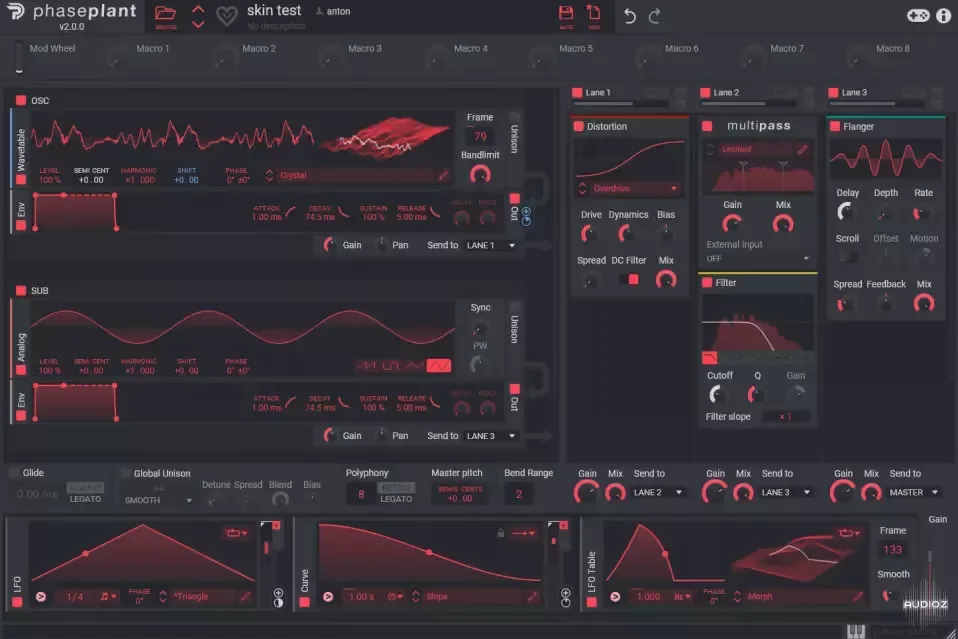
NASKO PHASEPLANT/KHS SKIN-FANTASTiC
PALADIN SKIN + ROYAL SKIN... Unpack the zip file - Windows: Move the colors.conf file into C:\ProgramData\Kilohearts folder! You will have to restart your DAW in order for all khs plugins to update their skin! - MacOS: Move the colors.conf file into Macintosh HD/Library/Application Support/Kiloheart
资源介绍
FANTASTiC | 10 November 2023 | 2 KB
PALADIN SKIN + ROYAL SKIN...
Unpack the zip file
- Windows: Move the colors.conf file into C:\ProgramData\Kilohearts folder! You will have to restart your DAW in order for all khs plugins to update their skin!
- MacOS: Move the colors.conf file into Macintosh HD/Library/Application Support/Kilohearts folder! You will have to restart your DAW in order for all khs plugins to update their skin!
相关推荐


WAV
预设音色
PastToFutureReverbs Dynacord DRP 20 All Factory Presets! Impulse Responses (IRs) WAV
0¥2 · 会员可下


预设音色
IInfinite and LifeStyleDidIt Summer Nights (Analog Lab V Bank)-FANTASTiC
0¥2 · 会员可下


预设音色
Toolroom The Sound Of Toolroom Serum Presets Vol. 2-FANTASTiC
0¥2 · 会员可下


预设音色
Loophole Sounds Louis Flynn x five TIMELESS (Analog Lab Bank)-FANTASTiC
0¥2 · 会员可下