Native Instruments-FM8 v1.4.6-TCD
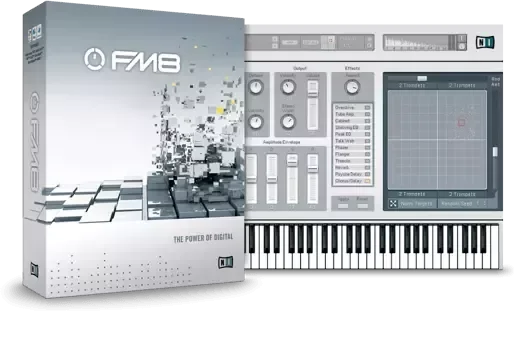
THE POWER OF DIGITAL 960 presets with sharp, crystal-clear FM sounds Powerful FM matrix, arpeggiator, flexible envelopes Loads patches from classic FM hardware units DIGITAL BRILLIANCE FM8 packs the intricacies of FM synthesis into a sleek user interface with innovative advanced features. CONTEMPORA
资源介绍
TCD | 08.2024 | 107.7 MB
THE POWER OF DIGITAL
960 presets with sharp, crystal-clear FM sounds
Powerful FM matrix, arpeggiator, flexible envelopes
Loads patches from classic FM hardware units
DIGITAL BRILLIANCE
FM8 packs the intricacies of FM synthesis into a sleek user interface with innovative advanced features.
CONTEMPORARY CLASSIC
Native Instruments has harnessed the power of FM synthesis. The strengths of digital are manifest in FM8’s powerful audio engine which generates breath-taking, brilliantly dynamic FM sound in pristine quality. With its emphasis on ease-of-use, the FM8 brings a high degree of simplicity to the otherwise intricate process of FM synthesis, delivering unsurpassed depth, brilliance, and dynamism.
SYNTHESIS FROM THE START
A central aspect of FM8 is usability. The "Easy Edit Page" offers a clearly-designed interface with simple controls that adjust more complex parameters automatically, allowing you to take a far more musical approach to FM synthesis. The more detailed editing pages have been improved for easier handling and are all accessible with just one click. FM8 lets you play straight away!
BEYOND FREQUENCY MODULATION
FM8 offers an unprecedented range of features and effects. The classic crystalline bells and keys are perfect for creating melodic and percussive sounds of the highest quality. A unique arpeggiator, a revolutionary sound morphing feature and a large selection of new, charismatic effects add countless sound-shaping possibilities. The sonic potential of FM8 goes well beyond the confines of conventional FM synthesis.
THE LIBRARY
The FM8 library contains over 1200 expertly-designed presets. Rich and detailed, they exemplify the strengths of FM synthesis, from dynamic digital pianos to bright, bold brass. Also included are a number of effect rack, sound morphing, and arpeggio presets. Simply search and you will find – instantly.
x64: SAL, AAX, VST3, VST2 | x86: JBridge
-TCD
*If you install the 3rd parts sounds (patches, presets, whatever you
prefer but for NI it's "sounds") it is probably a good idea
to move your existing folder so it doesn't get all mixed and
mashed. Compare, delete, do whatever you do after the install.
Rock on and enjoy!
Factory presets will be uninstalled if you choose to uninstall ever.
3rd party presets are permanent and cannot be removed automatically.
You will have to delete it manually if you wish it gone, ever.
This is so you can install official or other teams' releases down
the road and not lose the collection. A good idea doesn't require
force or motivations to be accepted. ;) Remember that in other
ventures you may have, or areas of life, if TCD may be a fortune
cookie for a brief moment, here. If cannot, go on now and play some FM8 pfffffft.
Your existing 3rd party preset folder is located @:
%USERPROFILE%\Documents\Native Instruments\FM8\Sounds
You can run these 2 commands from an elevated command prompt,
only one at a time, and then you're automatically ready to install:
cd "%USERPROFILE%\Documents\Native Instruments\FM8"
ren Sounds Sounds.BAK
Go here in Windows Explorer if you want to see your ren command
working or if it worked:
%USERPROFILE%\Documents\Native Instruments\FM8
Finally, to use the FX module, you have to route in to out
in "Expert" tab. Youtube can most likely find help about this.