Noah Kay MISST (AI Stem Separation Tool) v3.1.0 Win Standalone [FREE]
A local GUI music source separation tool built on Tkinter and demucs serving as a free and open source Stem Player This application uses state-of-the-art demucs source separation models to extract the 4 core stems from audio files (Bass, Drums, Other Instrumentals and Vocals). But it is not limited
资源介绍
Free| WiN Standalone | 2/194/1250 MB
A local GUI music source separation tool built on Tkinter and demucs serving as a free and open source Stem Player
This application uses state-of-the-art demucs source separation models to extract the 4 core stems from audio files (Bass, Drums, Other Instrumentals and Vocals). But it is not limited to this. MISST acts as a developped music player aswell, fit to enjoy and medal with your audio files as you see fit. MISST even comes prepared to import songs and playlists directly from your music library.
This project is OpenSource, feel free to use, study and/or send pull request.
MISST on Windows 11 with Dark mode and 'Blue' theme with 'Steve Lacy's Infrunami' playing
MISST on Windows 11 with Light mode and 'Blue' theme with 'Frank Ocean's Ivy' playing
MISST on Windows 11 Showcasing how versatile and personal you can be with MISST!
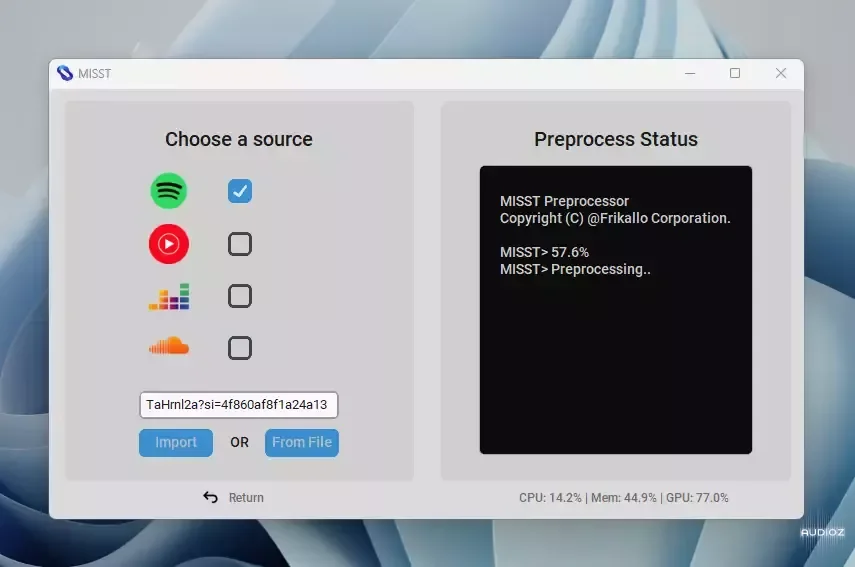
MISST on Windows 11 Showcasing how importing audios is as easy as two clicks!
Original Repository of MISST : Music/Instrumental Stem Separation Tool.
Objectives:
Import songs and playlists from your music library
Easy to use UI
Play your songs and playlists
Extract and manipulate the 4 core stems from your audio files as they play
Discord rich presence to show off your music to your friends
Save your stems as audio files
If imported from your music library, view lyrics and metadata just as you would in your old music player
Minimal memory usage
Customizable themes
Additional Efects like nightcore
Easy to use equalizer
Preprocessing service available on both CPU and GPU
Ability to change the pre-trained model used for separation
Small save size, comparable to the size of the inputted audio
Docker image (WIP)
Stable on Windows, Linux and MacOS (WIP)
Proper installer/updater (Not a priority)
Installation:
As of version 3.1.0, MISST is only available on windows with guaranteed compatibility.
Until a later release :
if you are not on a windows device please refer to Manual Installation.
if you are using conda on MacOs device please refer to Manual Installation - MacOS
Manual Installation:
Spoiler:
These instructions are for those installing MISST v3.1.0 manually only.
Download & install Python 3.9 or higher (but no lower than 3.9.0) here
Note: Ensure the "Add Python to PATH" box is checked
Download the Source code here
Open the command prompt from the MISST directory and run the following commands, separately -
$ python3 -m venv ./venv
$ pip install -r requirements.txt
$ python3 MISSTapp.py
Note: Install requirements-minimal.txt if you don't intend to accelerate preprocessing with your GPU.
From here you should be able to open and run the MISSTapp.py file
CUDA
CUDA must be installed and configured for the application to process any track with GPU acceleration. You will need to look up instruction on how to configure it on your operating system. Click here for nvidia's installation guide.
Benchmark:
The audio processing performance was evaluated using an NVIDIA GeForce RTX 2070 SUPER with 8GB VRAM and an AMD Ryzen 3700X 8-Core Processor on the htdemucs pretrained model. This test aimed to compare the processing time of audio on a CPU versus a GPU.
Here are the results of the test:
Inside Peeplink you will find 3 files,
*2MB .exe downloader: This will download MISST CPU or GPU-based models and content and install them. You need an internet connection.
*CPU-based files/194 MB: After downloading, unzip and run MISST.exe inside the main folder to start the app. You don't need an internet connection.
*GPU-based files/1.25 GB: After downloading, unzip and run MISST.exe inside the main folder to start the app. You don't need an internet connection.
Enjoy
If you don't have a decent GPU, download CPU version.







