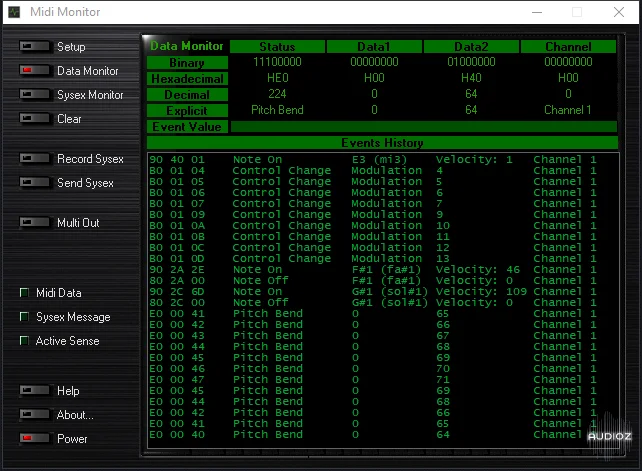
OBDS - Midi Monitor v2.1.1.3 WiN X86
Midi Monitor overview : ~ Midi Monitor is a powerful tool to learn about Midi, to setup a Midi configuration and to exchange Midi System exclusive data. Main features: ~ Midi channel messages real time monitoring (Note On/Off, AfterTouch, Pitch Bend, Control Change, Program Change) in binary, hexade
资源介绍
WIN | 2nd Nov 2K18 | 1.48MB
Midi Monitor overview :
~ Midi Monitor is a powerful tool to learn about Midi, to setup a Midi configuration and to
exchange Midi System exclusive data.
Main features:
~ Midi channel messages real time monitoring (Note On/Off, AfterTouch, Pitch Bend, Control
Change, Program Change) in binary, hexadecimal, decimal and explicit format.
~ Midi common message and midi sync message real time monitoring.
~ System Exclusive message real time monitoring.
~ System Exclusive Dump (receiving and transmitting).
~ Midi thru function (routing data from Midi input device to Midi output device).
Purpose:
~ For beginner in Midi system, MIDI Monitor is a very good tool to learn about Midi.
~ For most experienced user, MIDI Monitor will help to solve problem in a Midi configuration.
~ For all users Midi Monitor is a powerful tool to exchange Midi Sysex.
Connections:
~ Connect Keyboard or any MIDI Device to your Midi In interface, connect any MIDI Device to
your Midi Out interface.
Caution: Some drivers can be shared between several Midi applications.
Only on AudioZ
I found this Midi Monitor when I searching for a tool to update my Impulse's firmware.
It is simple, fast and easy to use.
On comparing the speed of flashing firmware of Midi Monitor with MIDI-OX Midi Monitor is very fast (only takes 5 seconds to flash my impulse's firmware.) while MIDI-OX is very slow (takes ~7 minutes to flash my impulse's firmware) and interrupts sometimes.
I'm disappointed by the registration window every time open this tool.
So, i decided to build a custom one and to release it to the community.







