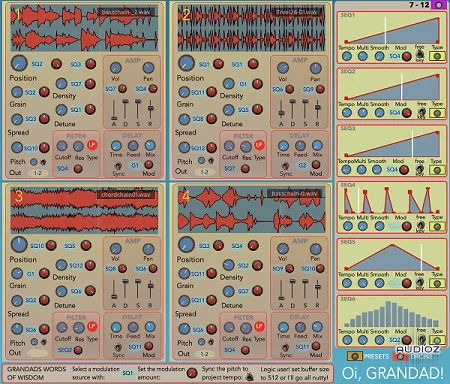
Oi, Grandad! Granular Synthesizer v0.7.1 AU macOS [FREE]
Oi, Grandad! is a 4 voice granular synthesiser built with HISE. It features: 4 independant granular voices with extensive controls 12 Modulation Sequencers Tracking modulation Drone button for sustained playback Delay per voice VST and Audio Unit Mac OS builds are avaialable here: https://github.com
资源介绍
FREE | PKG |698 MB/31 MB/32 MB
Oi, Grandad! is a 4 voice granular synthesiser built with HISE.
It features:
4 independant granular voices with extensive controls
12 Modulation Sequencers
Tracking modulation
Drone button for sustained playback
Delay per voice
VST and Audio Unit Mac OS builds are avaialable here:
https://github.com/publicsamples/Oi-Grandad/releases
For a quick overview of the functionality see:
https://github.com/publicsamples/Oi-Grandad/wiki/Oi,-Grandad!-Basic-Guide
Logic users please note: It seems Oi, Grandad! will "glitch out" using any buffer size below 512 samples.
Installation
Audio Unit
In the Finder choose Go > Go to Folder, enter "/Library/Audio/Plug-Ins/Components" into the Go to Folder field, then click Go.
Copy "oi grandad.component" into this folder
VST
In the Finder choose Go > Go to Folder, enter "/Library/Audio/Plug-Ins/VST" into the Go to Folder field, then click Go.
Copy "oi grandad.VST3" to into this folder
Samples and Presets
In the Finder choose Go > Go to Folder, enter "~/Library/Application Support" into the Go to Folder field, then click Go.
Copy "modularsamples" folder into this folder
On loading your DAW you may see a message saying “the developer cannot be verified” to fix this open System Preferences → Security and Privacy. On the general tab click ‘Open anyway’.
https://support.apple.com/en-us/HT202491
No Demo.