Signal Perspective Trailbender v1.0.0 VST3 AU STANDALONE WiN MAC [FREE]
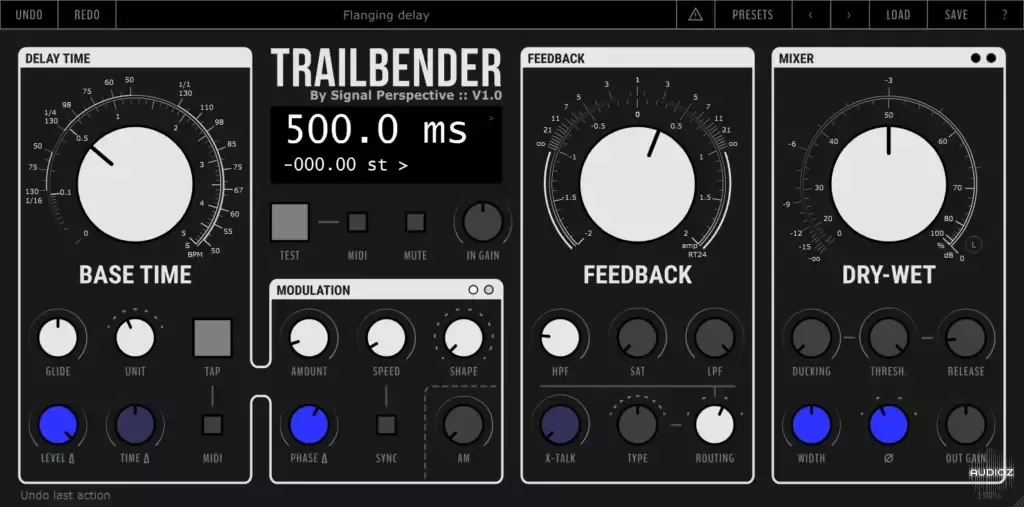
During the last few years, I developed a VST plugin to show my students how a delay line can be tweaked to act as a mod fx, a pitch shifter, a synthesizer, and other things. With time I found myself using it in many “real world” scenarios, so I decided to release it. Features Speaking of features, t
资源介绍
18/12/2023 | VST3 AU STANDALONE WiN MAC | 13 MB
During the last few years, I developed a VST plugin to show my students how a delay line can be tweaked to act as a mod fx, a pitch shifter, a synthesizer, and other things. With time I found myself using it in many “real world” scenarios, so I decided to release it.
Features
Speaking of features, the most noticeable are:
Many units of measure for the time parameter;
Many modulation waveforms, including custom external signals (external sidechain must be enabled in the advanced settings);
Many saturation “flavours”;
Saturation and filters can be applied before the DDL, after the DDL or on the feedback loop;
Dry-wet locking (useful when browsing presets);
A mute button (more useful than bypass when the plugin is used in send);
A “comments” space to take notes that are saved together with preset or plugin instance state.
The GUI also has some slight peculiarities: since Trailbender has many parameters, I tried to help the user by “lighting up” only those knobs that are affecting the sound. Moreover, the blue colour is used for those parameters affecting the stereo image.
Knob colors
Finally, the most nerdy settings are available in an “advanced” section accessible by clicking on the little arrow in the upper right corner of the info display. Moreover, a tooltip system lets you learn how to use the plugin without the need for a user manual.
Advanced settings
Installation
Some plugins come with an installer application, if this is not the case, copy the plugins to the appropriate folder:
macOS VST3 folder: ~/Library/Audio/Plug-Ins/VST3
macOS AU folder: ~/Library/Audio/Plug-Ins/Components
Windows VST3 folder: C:\Program Files\Common Files\VST3
Please note that the plugins are not digitally signed: if you have trouble running the plugin under macOS, try typing the following in the os terminal (replace PluginFileName with the name of the downloaded files):
sudo xattr -d -r com.apple.quarantine /Library/Audio/Plug-Ins/VST3/PluginFileName.vst3
sudo xattr -d -r com.apple.quarantine /Library/Audio/Plug-Ins/Components/PluginFileName.component
The standalone application is portable, meaning that it does not need installation, just unzip the downloaded file and bring the executable wherever you want.
Important notice about provided preset files
To let the plugin/application see the preset files and show them in the preset menu, be sure to place them in the user documents folder under the /Signal Perspective/PluginName subfolder, without altering the provided tree structure.







