SuperflyDSP Lost-Tapes v1.1.2/1.1.5 x64 VST3 AU WiN MAC [FREE]
LoFi effects allows you to obtain vintage aka old-school sound. Lost-Tapes effect is based on tape emulation, but do not claim to model any hardware model. Lost-tapes modify with character your sound with state of the art algorithms. Plugins can be used mainly on instruments (like guitar, vocals or
资源介绍
09/04/2023 | x64 VST3 AU WiN MAC | 6 MB
LoFi effects allows you to obtain vintage aka old-school sound. Lost-Tapes effect is based on tape emulation, but do not claim to model any hardware model.
Lost-tapes modify with character your sound with state of the art algorithms. Plugins can be used mainly on instruments (like guitar, vocals or keyboards.), but also on stem track like drum-kit or stacked chord track.
Good to know, as an analog hardware tape recorder, more the input signal amplitude is large, more harmonic distortion is high.
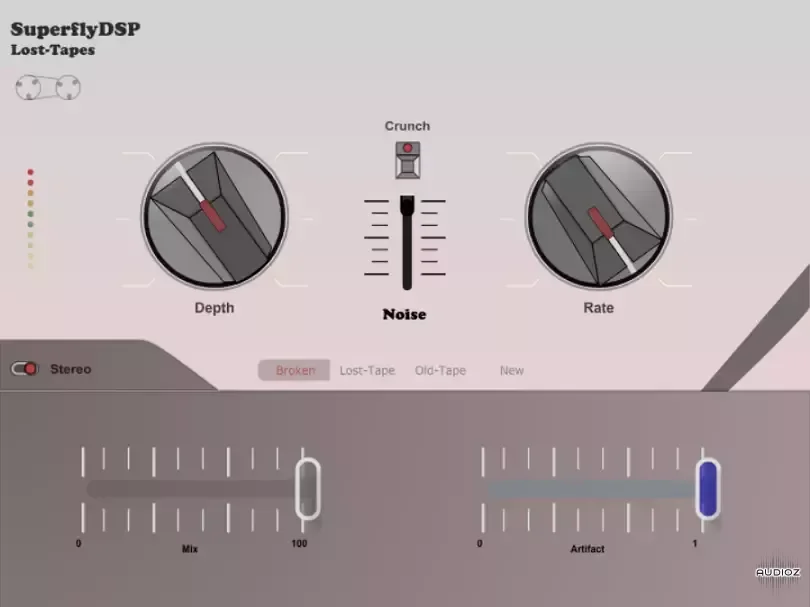
Tape-type buttons affects mainly the frequency bandwith.
Artifact add glitch and increase distorsion.
Depth increase the tape effect.
Rate increase flutter frequency
Crunch button add more harmonic distorsion.
Mix effect allow you to mix dry sound and effected sound to obtain a kind of Chorus.
Noise slider allow you to increase noise volume.
Stereo mode add unique wide stereo (especialy effective on synth lead or electric keyboard).
Features
Resizable Gui
Strong anti-aliasing algorithm
Low cpu consumption
Cross-platform
Built-in preset
Compatibility:
Operatings systems : Windows 7/8/10/11 – Linux 64bit – MacOs
Plugin format : VST3 – AudioUnit
Audio host buffer size : [64, 128, 256, 512, 1024, 2048]
Sampling frequency : [44.1KHz ; 192KHz]
FLStudio user please set fixed buffer length from plugin setting window, activate Processing>Use fixed size buffers!
Installation:
Windows : Extract the .zip on your VST plugin folder, default path is C:\Program Files\Common Files\VST3
Linux : Extract the .zip on your VST plugins folder, default path depend of your distribution.
If you don’t know your path check it on your DAW preferences.
Copy the whole vst folder not just .so
MacOS
Install default path:
AU USER PATH : ~/Library/Audio/Plug-Ins/Components
AU SYSTEM PATH : Macintosh HD/Library/Audio/Plug-Ins/Components
VST USER PATH. : ~/Library/Audio/Plug-Ins/VST3
VST SYSTEM PATH: Macintosh HD/Library/Audio/Plug-Ins/VST3
Catalina issue: To launch an un-signed application go into System Preferences > Privacy & Security where the application is listed and you can “Allow anyway”. »
Latest Linux version of plugin hasn't changed (v1.0.2), so I don't post double.







