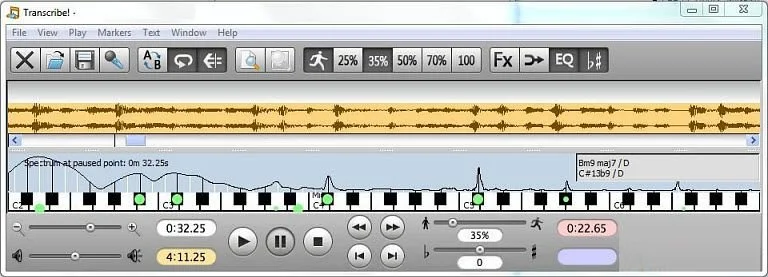
Transcribe v8.40 WiN
The Transcribe! application is an assistant for people who sometimes want to work out a piece of music from a recording, in order to write it out, or play it themselves, or both. It doesn't do the transcribing for you, but it is essentially a specialised player program which is optimised for the pur
资源介绍
FFF Keygen | July 16 2015 | 2.3 MB
The Transcribe! application is an assistant for people who sometimes want to work out a piece of music from a recording, in order to write it out, or play it themselves, or both. It doesn't do the transcribing for you, but it is essentially a specialised player program which is optimised for the purpose of transcription. It has many transcription-specific features not found on conventional music players.
Features
Depending on version, Transcribe! reads audio from many different types of audio file and audio CD. It also has a "Record" facility for recording from analog sources such as cassette or vinyl. It displays the audio waveform and allows you to scroll around, place markers for sections, measures and beats, and easily play or loop from any point.
Transcribe! can also display the video synchronised to the audio for many video files.
Loops and positions can be stored and recalled. There are many keyboard shortcuts and you can configure these as you like. You can configure Transcribe! to respond to pedals of various types so as to keep your hands free : start and stop playback with your feet!
There is extensive and readable help accessible from within the program.
The "spectrum" feature displays the strength of the various pitches in any chord or note you select, in the form of a graph - a wavy line over a piano keyboard graphic. The height of the various peaks in the graph indicate the strength of the note above which the peak appears. This is not a magic bullet for analysing chords but it can be a very useful source of information.
Transcribe! will perform "note guessing" and "chord guessing" - that is, it will attempt to interpret the spectrum information for you, marking the notes being played on the piano keyboard, and attempting to name the chords (in standard form such as "Am", "E7#9", etc). Note guesses can be displayed in "piano roll" form, showing the guesses over time, aligned to the waveform view.
Transcribe! supports Automation (or Scripting). You can run Transcribe! automatically from commands in a file, perhaps to process a number of sound files, saving them at different altered speeds, or to instruct Transcribe! to play various sound files with various effects.
Transcribe! offers various audio processing effects (Slowdown, Pitch Change, EQ filtering etc) intended to help with transcribing. These effects all run in "real time" unless your machine is old & slow. This means there is no pre-processing or other waiting, the processing is performed on-the-fly while playing and you can instantly hear the effect of changes to EQ etc. For instance if you press the half-speed button while playing then playback simply continues, at half speed.
Changelog
Spoiler:
There are no massive new features here, but a number of small
improvements and fixes.
-- Export Split Sound/Video: there is now a "Measure marker
ends split track" checkbox. It used to be the case that a measure
marker would always end a split track but this can be a nuisance
if you have already placed lots of measure markers.
-- Marker dragging: if you hold down the control key as you release the mouse button then you can move
multiple markers. If there is a selection and you drag a marker
which is in that selection, then you will drag just the markers
in that selection. Otherwise you drag them all.
-- There is now a separate volume control for cue/review in
Preferences - Playback. Set the slider to maximum to get the same
as the normal playback volume. However it is often preferable to
have cue/review be a bit quieter.
-- Timeline - added finer divisions than one second, when there
is room.
-- Added Preferences - General - Mouse Wheel Sensitivity setting.
-- When editing the text of a text block, you now get the correct
font, the same font that it will be displayed with.
*** Video Viewer
-- Added "Vertical Flip" to the Video Viewer (on the Video Viewer
"View" menu). This is for guitarists and possibly others: Vertical
Flip can present you with the same view of the fingerboard that you
have yourself when playing : when you watch a guitarist playing,
the highest pitched string is the lowest in your field of view. But
when you play and look at the fingerboard, the highest pitched string
is the highest in your field of view.
-- In the Video Viewer if you held down a keyboard shortcut (which
you might well do e.g. with 'c'ue or 'r'eview) then you could get
a backlog of keystrokes which would take a while to clear. This
should now be fixed.
-- Some videos have always played jerkily and the best solution is
to change the video encoding. However I hope some of these problem
相关推荐

效果器插件
Slate Digital MetaTune v1.2.3.0 U2B macOS 阅读 NFO-GUISEPPEv1.2.3.0
效果器插件
Slate Digital MetaTune v1.2.3.0 WiN 独立 VST2/VST3v1.2.3.0
效果器插件
ArtsAcoustic - Reverb 1.6.0.15、BigRock 1.0.7、CL Series 1.0.19、VST x86 x64(无需安装,SymLink 安装程序)[19.03.2017]
效果器插件