Tugrulakyuz TugMidiSeq v2.3.0 Win Mac [FREE]
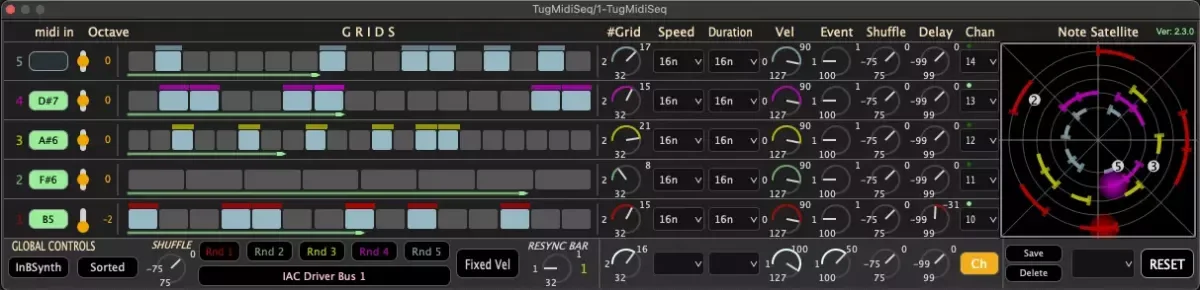
2RuleMidiSeq ( TugMidiSeq ) is a polyphonic arp and seq creator. The notes of the pressed chords are automatically lined up from the lowest pitch to the highest pitch, creating musical polyphonic pattens according to the beat moments in the seq window. A circular note flow display for fun. Parameter
资源介绍
FREE | Win Mac | 7.6 MB
2RuleMidiSeq ( TugMidiSeq ) is a polyphonic arp and seq creator.
The notes of the pressed chords are automatically lined up from the lowest pitch to the highest pitch, creating musical polyphonic pattens according to the beat moments in the seq window.
A circular note flow display for fun.
Parameters:
Variable speeds for each chord note.
Variable beats for each chord note.
Variable velocity for each chord note.
Variable duration of note.
Octaves for each chord notes.
Midiin for chords (your own fingers) :-).
ReSync.
Seq Matrix.
Randomization.
Presets.
InBuilt SineWave synth for check pattern.
Extra Features:
-In addition to the already existing adjustable velocity knobs, the option of using the velocity of the midi-in "FixVel./InVel." button has been added.
-In addition to the automatic ordering of the notes according to the "from low to high pitch", the option of "setting automatically incoming MIDI note to the lowest empty line" is added (NoteOrdered/NoteFirstIn button). In this case, when pressed up a note, the corresponding line becomes empty (the sorting algorithm is not called).
V2: In addition to Shuffle and Event Randomization, 2RuleMidiSeq still offers a wide range of parameters to shape your sounds. Variable speeds, beats, velocities, and durations allow precise control over each chord note. The built-in SineWave synth lets you audition your patterns instantly.
Changes :
Spoiler:
NEW TugMidiSeq 2.1:
Velocity adjustment for note (box) : Shift + Left Mouse
Delay for each line (-+) max 8th
Separated shuffle for each line (way to MicroRhythm)
GUI refinements
Several bugs fixed
UPDATE TugMidiSeq 2.2:
Added feature so users can hear the note pressed on the keyboard when playback is stopped
Sort Button exception fixed
version number added to up right corner
UPDATE TugMidiSeq 2.2.1:
First notes ring problem fixed
UPDATE TugMidiSeq 2.2.2:
When playback is off, latency changes were not being updated in the Satellite window. Problem fixed.
UPDATE TugMidiSeq 2.3.0:
Each Lane can be routed to different instrument via loopback midi
Solo Button added
Sample Based Seq/Arp implementation (much more robust)
GUI improvement
WARNIG!! : Some DAWs send MIDI notes created in TugMidiSeq back to the track, which can cause MIDI message loops. To avoid this issue, make sure to specifically select the MIDI keyboard during playback for the TugMidiSeq track.
MAC midi LoopBack is native and can be set
https://help.ableton.com/hc/en-us/articles/209774225-Setting-up-a-virtual-MIDI-bus#Mac
Windows midi LoopBack can be downloaded
https://www.tobias-erichsen.de/software/loopmidi.html
Mac Security issue :
Spoiler:
Hi everybody
Some Mac users mention that due to Catalina(also Big Sure and Monterey) security issue, Ableton and similar DAWs do not recognize tugMidiSeq. There are 2 solutions for this:
This solution is only valid for Ableton users, if Ableton users do not trust me as a developer, they can download the max4live version from https://tugrulakyuz.gumroad.com/l/xfzgta, it is 100% safe for the user as the patch runs on max4live framework.
Other DAW users (including Ableton) can bypass security steps if they trust me as a developer.
a)Before copying tugMidiSeq to vst3 folder, open Ableton and do "Plugin Rescan."
b) after Rescan is finished, copy tugMidiSeq to the corresponding vst3 folder.
c) Open the terminal(MAC) window and go to the vst3 folder and type "sudo xattr -rd com.apple.quarantine tugMidiSeq.vst3" and enter. (it can ask your password of your macos screen)
d) Do again Rescan on Ableton.
I did all steps in order and it worked, I hope it works for you too.
If you encounter a problem, you can send an e-mail to [email protected].
The video I used:
Win Mac VST3 AU







