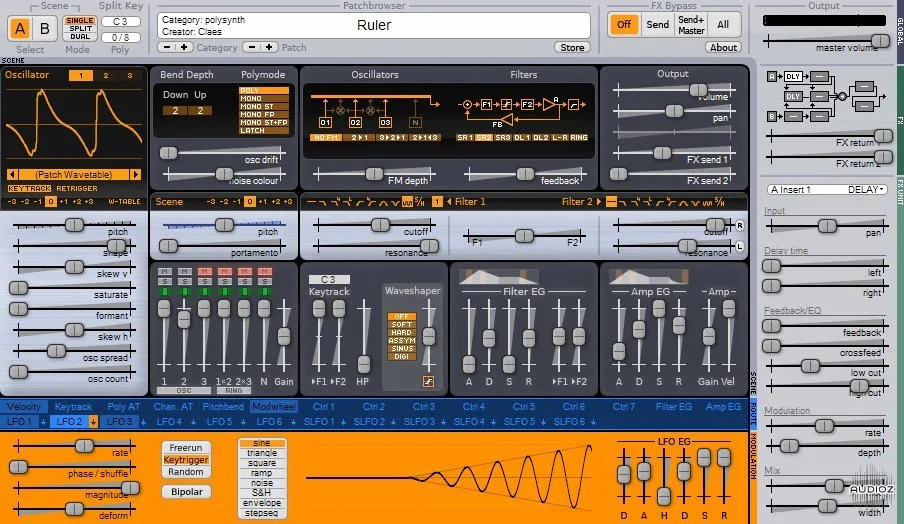
Vember Audio Surge v1.6.5 x64 x86 VST AU WiN MAC LiN [FREE]
Digital Beauty. Surge is a digital synth and makes no bones about it. If you have used it in the past, it will be like welcoming an old friend back into your life. If you are new to Surge, welcome to the party. Come on in, the water is fine. Synthesis method: Subtractive hybrid Each patch contain tw
资源介绍
06.02.2020 | x64 x86 VST AU WiN MAC LiN | 33/73 MB
Digital Beauty. Surge is a digital synth and makes no bones about it.
If you have used it in the past, it will be like welcoming an old friend back into your life. If you are new to Surge, welcome to the party. Come on in, the water is fine.
Synthesis method: Subtractive hybrid
Each patch contain two 'scenes' which are separate instances of the entire synthesis engine (except effects) that can be used for layering or split patches.
Quick category-based patch browser
FACTORY SOUNDS
1010 patches
183 wavetables
OSCILLATORS
3 oscillators per voice
8 versatile oscillator algorithms: Classic, Sine, Wavetable, Window, FM2, FM3, S/H Noise and Audio input
The classic oscillator is a morphable pulse/saw/dual saw oscillator with a sub-oscillator and self-sync.
The FM2/FM3 oscillators consists of a carrier and 2 or 3 modulators and various options.
Most algorithms (except FM2, FM3, Sine and Audio-input) offer up to 16-voice unison at the oscillator level.
Oscillator FM/ring modulation
Most oscillator algorithms (except FM2/FM3) are strictly band-limited, yet still cover the entire audible spectrum, delivering a clear punchy yet clean sound.
Noise generator with variable spectrum.
FILTER BLOCK
Two filter units in 8 different configurations
Feedback loop (number of variations inside the parenthesis)
Available filter algorithms: LP12 (3 variations), LP24 (3 variations), LP Ladder (1-4 poles), HP12 (3 variations), HP24 (3 variations), BP (4 variations), Notch (2 variations), Comb (4 variations), S&H
Filters can self-oscillate (with excitation) and respond amazingly fast to cutoff frequency changes.
Waveshaper (5 shapes)
MODULATION
12 LFO units available, 6 are per voice and 6 are global for the whole scene
DAHDSR envelope generators on every LFO-unit
7 deformable LFO waveforms + drawable/step sequencer waveform
LFO 1 allows envelope retriggering when used as step sequencer
Extremely fast and flexible modulation routing. Almost every continuous parameter can be modulated.
EFFECTS
8 effect units arranged as 2 inserts per scene, 2 sends and 2 master effects
10 top-quality algorithms:
Delay, Reverb, Chorus, Phaser, EQ, Distortion, Conditioner (EQ, stereo-image control, and limiter), Rotary speaker, Frequency shifter, Vocoder
System Requirements
MAC
Intel MAC running at least macOS 10.11
Minimum of 4GB of RAM
VST-compatible or AU-compatible Host application
WINDOWS
Windows 7 and a recent intel processor (at least Pentium 4 or above)
Recommended: Computer running Windows 7 64 bit or newer
Minimum of 4GB of RAM
VST-compatible Host application
x64-compatible CPU, OS and Host is required to use the 64-bit version
LINUX
PC Running a Linux Distro
The computer's CPU must support the SSE2 instruction set. This has been supported on Intel CPUs since Pentium 4, and on AMD CPUs since Athlon 64.
Minimum of 4GB of RAM
VST-compatible Host application
x64-compatible CPU, OS and Host is required to use the 64-bit version
Changes in Version 1.6.5
New Features for Playing Surge
Added a “Channel Split” mode to split by midi channel across scenes, just like the KeySplit mode does with key
Several changes to the alternate tuning implementation
We have full support for scala KBM files, including full keyboard remapping, scale 0, and frequency 0 selection.
The default tuning constant key is Midi note 60 / 261.63 hz
The scale viewer shows frequencies per key
Correct an error where tuning could interfere with filter cutoffs and delay timings, especially with long scales
Changes to the Modulation Section
When any control is TempoSynced, show a beats- display as well as a time-display on the LFO grid (not available on Linux)
Temposync all controls for an LFO modulator with a single RMB gesture on any control.
Add LFO Envelope “Lanes” in the LFO-1 retrigger section. Use shift- or right-click on the retrigger section to trigger both the Amp and Filter envelope or just one or the other.
Make envelope retrigger work properly for Analog mode envelopes.
Choose a more on-theme blue for the step sequencer section, rather than that wierd green.
A “Green Line” shows how far you have modulated when you modulate a slider. Try it!
Changes related to MPE
The global pitch bend (ch0 pitch wheel) no longer double-bends in MPE mode
MPE pitch bend state is per instance and saved in the DAW state, so you can use two surges with mpe bend of 24 and 48 in a single project, if you happen to have both a Seaboard and a Linnstrument. Say.
Changes to the VST3
SideChain support is properly supported with a kAux channel, meaning SideChain works in Cubase Pro. Additionally, in Reaper versions > 6.02 the VST3 will properly configure routing for sidechaining when dragged into a track. (For earlier versions see here.)
Support VST3 context menus. Right mouse on a param in the VST3 in a modern DAW and check it out!
VST3 Automation for the special “CC” controls works.
LFO freerun works if transport is not running.
Change the Windows Installation Locations
Windows now reads shared content from %PROGRAMDATA% (c:\ProgramData\Surge) and then if missing from %LOCALAPPDATA%
The Windows Installer installes common assets in %PROGRAMDATA%
To allow debugging, the About screen on all platforms shows the data paths.
A new collection of third party presets from Dan Mauer.
Other Workflow and Engine Improvements
You can export a wavetable from a patch to a standalone wavetable using the export menu item in the oscillator wavetable selector
The Envelopes in analog mode corrected decay behavior and support sustain swells
The Digital envelopes in quadritic decay mode work with sustain 0
LFO phase is properly modulatable (modulated phase is snapped when an LFO starts and is not modulatable once going)
TempoSync was not correctly unstreamed on the Delay effect.
TempoSync in Delay is correctly initialized when first played in a new DAW instance.
The AU unstreams zoom properly in Logic Pro
The AU allows automation of the “CC” and “Master” parameters properly
Other UI Improvements
Windows Touch devices now work with the Surge UI
Fix a problem with a ‘spiky’ draw of the Square Wave on Windows
Several UI elements are higher contrast, several text displays are more consistently formatted
Frequency sliders (like Cutoff frequency) show a midi name as well as a frequency in their popups and string displays
TempoSync sliders show their status with a little “TS” on the handle.
FrameClose in the VST2 called at the appropriate time.
VST Names for FX Params are distinct per param
Code Changes
Add and activate many unit tests spanning tuning, modulation, and much more
Add support for builds with Visual Studio 2019







