Vivek Vijayan Pulp Fiction v1.1.0 WiN Linux [FREE]
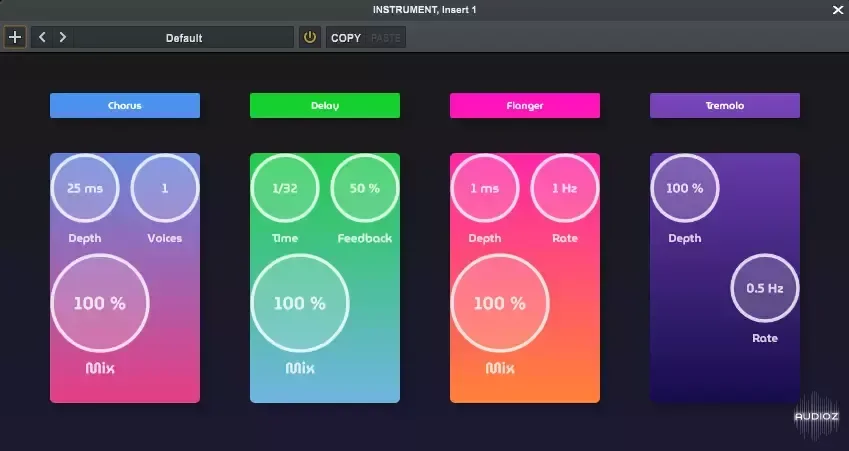
Multi FX rack plugin Pulp Fiction is a multi-FX rack plugin with four slots, allowing users to choose audio effects for each slot from a drop-down menu. Usage Insert Plugin: Load Pulp fiction into your preferred digital audio workstation (DAW). Select and Adjust Effects: Each slot can be assigned on
资源介绍
FREE | Win Linux VST3 | 18 MB
Multi FX rack plugin
Pulp Fiction is a multi-FX rack plugin with four slots, allowing users to choose audio effects for each slot from a drop-down menu.
Usage
Insert Plugin: Load Pulp fiction into your preferred digital audio workstation (DAW).
Select and Adjust Effects:
Each slot can be assigned one of the following effects:
Chorus:
Depth (ms): Controls the amount of delay modulation.
Voices (number): Determines the number of voices.
Mix (%): Controls the balance between the dry signal and wet signal.
Delay:
Time (bars): Determines the delay interval.
Feedback (%): Controls the amount of delay.
Mix (%): Controls the balance between the dry signal and wet signal.
Flanger:
Depth (ms): Controls the amount of delay modulation.
Rate (Hz): Controls the rate of the modulation.
Mix (%): Controls the balance between the dry signal and wet signal.
Tremolo:
Depth (%): Controls the amount of amplitude modulation.
Rate (Hz): Controls the rate of the modulation.
Vibrato:
Depth (ms): Controls the amount of pitch modulation.
Rate (Hz): Controls the rate of the modulation.
Customize Your Sound: Adjust the parameters to fine-tune each effect to your preference.
Installation
VST3 Installation (Windows)
Download the Plugin: Download Pulp.fiction.vst3 from releases.
Install the Plugin:
Copy the file into your DAW's plugin directory.
Rescan Plugins: Follow your DAW's instructions to rescan plugins or manually add the plugin if necessary.







