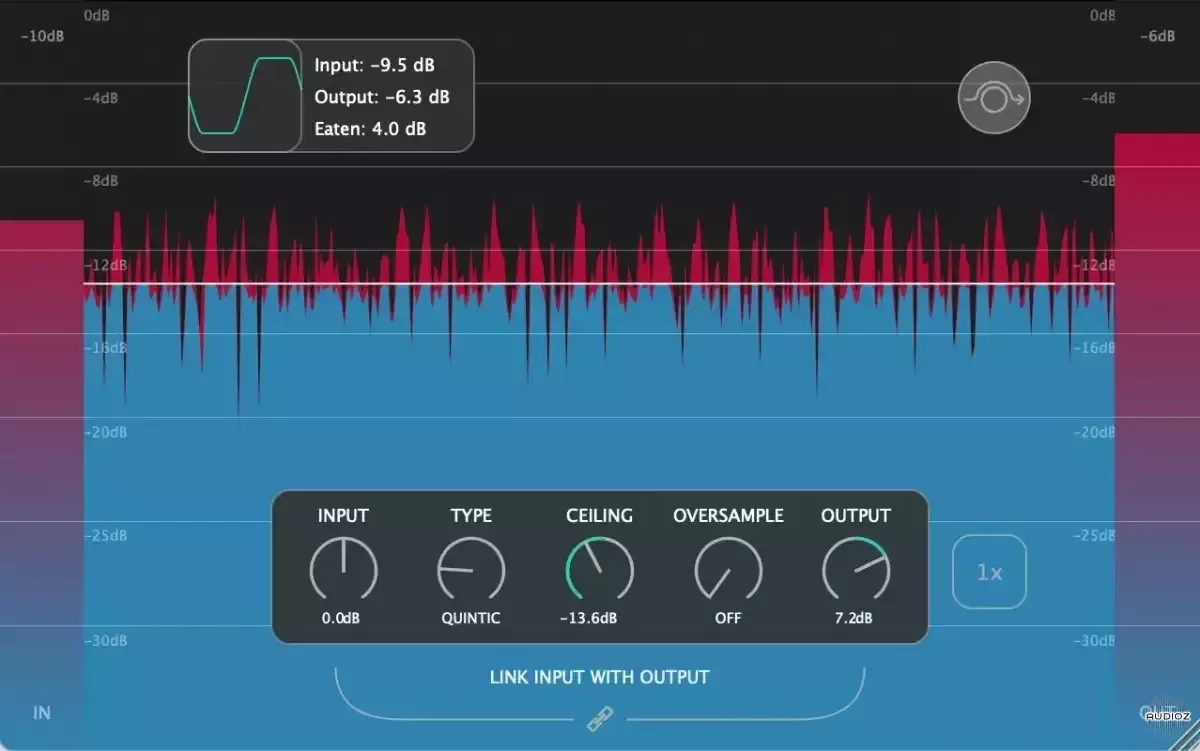
Vladyslav Voinov PeakEater v0.8.2 x64 VST3 AU LV2 CLAP LiNUX WiN MAC [FREE]
PeakEater is a free, easy to use waveshaping plugin. PeakEater lets you choose between different waveshaping functions to clip everything above ceiling level. Therefore, you can boost overall volume of your track safely without worying that some nasty peak would go above maximum allowed volume level
资源介绍
19/11/2023 | x64 VST3 AU LV2 CLAP WiN MAC LiNUX | 18 MB
PeakEater is a free, easy to use waveshaping plugin. PeakEater lets you choose between different waveshaping functions to clip everything above ceiling level. Therefore, you can boost overall volume of your track safely without worying that some nasty peak would go above maximum allowed volume level of your DAW. It supports variours features such as multiple clipping types, oversampling and visualizations of clipping process that aims to make clipping easy and fun.
Features
Input & Output RMS Meters
Input & Output Gain
Adjusts gain level before and after processing. Input Gain is useful when you're either working with too quiet or too loud signal and Output Gain can be helpful to compensate loss of gain.
Link Input with Output
Use linking to automatically set the Output Gain level to the opposite of the Input Gain. For example, if the Input Gain value is set to +5dB then the Output Gain value will be automatically set to -5dB and vice versa.
Ceiling control
Control your ceiling. Everything above this level would be "eaten". Build-in RMS meter would show you signal level that comes into clipper and help you set threshold.
Visualizer
Displays magnitude(in dB's) so you can see how peaks were eaten over time.
Analyzer
Shows approximated RMS that was cut("Eaten") in last 2 seconds and current clipping algorithm. Double-click on numbers to drop it to zero and force to re-calculate.
Switchable scales
switch-db-level-scales
Right click on Visualizer to switch between different scales.
6 Clipping Types
Choose between 6 clipping functions, from Hard clipping to different types Soft Clip(Up to Arctangent). Available clipping functions are:
Hard
Quintic
Cubic
Tangent
Algebraic
Arctangent
You can read more about difference between Hard and Soft clipping here and here.
Oversampling
Choose between 2x, 4x, 8x, and 16x oversampling to avoid signal aliasing. You can also turn off oversampling.
Note High values of oversampling may hurt CPU performance.
You can read more about oversampling here.
Bypass mode
Bypasses all plugin's processing. Useful when you need to make side-by-side comparsion before and after processing.
Resizing
Drag the corner to change the size of the window.
VST3, AU, LV2 and CLAP support
You can use either VST3, AU(macOS only), LV2 or CLAP type of plugin.
v0.8.2 Latest
Improvements
[DSP] Switch from IIR to the FIR filter for the Oversampler(switched after reading this article and reading how other plugins doing this). This should give fewer re-sampling artifacts although expect slight latency(for me latency was ~1ms at x32 oversampling)
Note
Although IIR has been exchanged with the FIR, I would like to give the option to switch between them. Planning to do it in future releases
Bugfixes
DSP - Fix the comb filter effect that happened during Dry/Wet usage in the Oversampling mode
[DSP] Fix latency reporting to the DAW
GUI - Fix the confusing positioning of the link-in-out button
[DSP] Fix incorrect up-sample rate calculation
Other - Bring back the macOS 10.9 minimal version since CI seems to support it
v0.7.1
Features
32x Oversampling
Higher quality of oversampling(more info)
v0.6.5
Improvements
Window size is preserved after open/close
Bypass button inside plugin works independently from the host's one. This shall unify behaviour across all DAW's
JUCE upgraded to the v7.0.5







